
Capture it your way.
Use the built-in camera or your phone’s camera app. Add photos, notes and annotations to the right issue.
Capture what you see. Keep the fix moving. Give the client a clear record.
PROJECT
Inspection · Sarah Miller
Sample workflow · Field Report for Android
From a quick site visit to a full inspection, keep the evidence and the next step together.
Use the built-in camera or your phone’s camera app. Add photos, notes and annotations to the right issue.
Return to the issue, record the fix and share a comparison card. Follow the history across the project.
Choose a PDF layout or save your own template. Add branding and signatures, then export a report ready to send.
Keep the original evidence, the follow-up and the result in one project. A clean handover starts with a clear record.
Take a photo, type a note or use offline English and Chinese dictation.
Add fix photos and notes. Review the project timeline.
Export a PDF or share a customer viewing link for feedback.
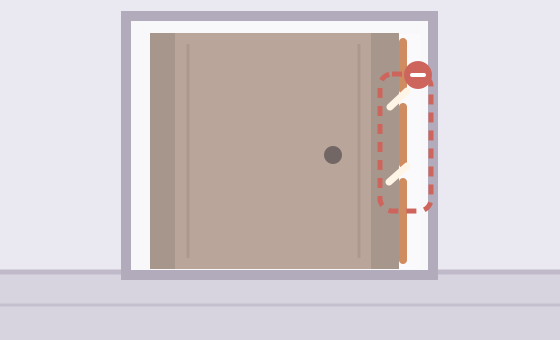
Before · Gaps in the door seal
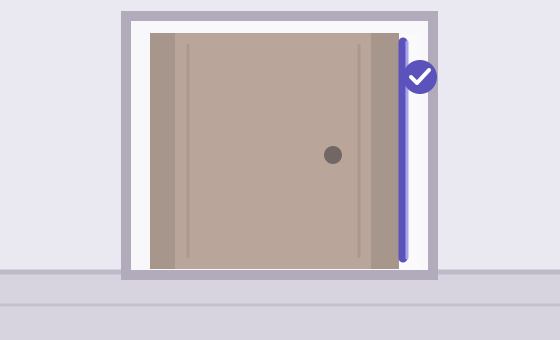
After · Seal replaced
One project. Clear ownership of every issue.
Share a project, assign issues and let each member focus on their own tasks. Members can also report new issues.
Add a member, reclaim a seat and pass it to someone else.
Protect project details and report templates with member permissions.
Team evidence syncs through private cloud storage. Downloaded evidence stays available locally.
ExtraWork keeps quotes, client approvals, bills and receipts connected to the job.
Explore ExtraWork ↗Try every feature for 7 days. Software licenses are a one-time purchase. Team cloud service is renewed separately.
Price shown in Google Play
FOR A SMALL CREW
Includes the purchaser
FOR A GROWING TEAM
Includes the purchaser
Team allowances are shared. Cloud renewals are manual, with no automatic charges. Cloud expiry pauses online photo uploads and reads; software seats and downloaded evidence remain usable. USD reference prices; final availability and local prices are shown in Google Play. Purchases and cloud renewals are handled in the Android app through Google Play.
Field Report is an Android app for documenting site inspections and repairs. It connects issue photos, descriptions, follow-up records, team assignments and custom PDF reports in one project.
Field Report is designed for independent inspectors, maintenance professionals, contractors and small teams who need to record issues, track fixes and hand over a clear report.
You can capture evidence and prepare reports locally. Signing in, team synchronization and customer viewing links need a connection. Team access must be refreshed online at least every 24 hours.
No. Send a PDF, a comparison card or a customer viewing link. Customer links can be opened in a browser and support feedback.
The first year is included in the team plan. After that, you can manually renew for $15/year or $39/year. The software license itself remains permanent.
Personal project photos are stored on your device. Photos shared through team projects are stored in private cloud storage. Customer sharing sends the content you choose to share.
Field Report is currently in closed testing on Google Play. Joining the test requires an invitation. Contact us below to ask about testing access.
Capture, follow up and deliver — in one place.
Ask about the product, report a problem, discuss a partnership, or send a privacy request. Messages go directly to the Field Report team.